Hosted cluster startup roadmap
This page follows HostedCluster startup, beginning with creation of the
HostedCluster API object and ending when the control plane, requested workers,
and guest operators are ready. It covers AWS and self-managed Azure with
managed etcd (spec.etcd.managementType=Managed). Unmanaged-etcd clusters use
an external etcd service and do not deploy or wait for the managed-etcd
component shown in this roadmap. Their external-etcd configuration and
availability need separate checks. ARO HCP uses a different provisioning
process and is outside this guide's scope.
This guide uses HC for HostedCluster, HCP for HostedControlPlane, CPC for ControlPlaneComponent, and KAS for kube-apiserver.
For component timings and debugging examples, see the AWS startup debugging examples for 5.0.0-rc.7 and the comparison of two HostedClusters. For deletion stages, cleanup checks, and teardown timing examples, see the AWS teardown roadmap.
Timing examples from development clusters only
All measured times in these lifecycle pages and charts come from two AWS HostedClusters created and destroyed in development on the same warm management cluster. They illustrate readiness and cleanup gates; they do not indicate expected startup or teardown times for managed services such as ROSA HCP or ARO HCP, production deployments, Azure, or other environments. They are not performance benchmarks, deadlines, SLAs, or SLOs. Measure the target environment separately before setting timing expectations.
The roadmap follows the controllers in this repository. These controllers can work at the same time:
- The HyperShift Operator (HO) continues creating management-cluster resources while the Control Plane Operator (CPO) starts the control plane.
- CAPI infrastructure can continue provisioning while control-plane workloads are starting.
- NodePool bootstrap can begin as soon as the hosted API kubeconfig exists, before every control-plane component has finished rolling out.
- Guest ClusterVersion and ClusterOperator convergence continues after the NodePool reports ready.
Use the stage gates below to find the next unmet dependency. Check the dependency conditions as well as the timestamps to establish startup order.
Existing SLO targets are not observed baselines
SLOs defines CI targets such as HostedCluster availability in under five minutes, NodePool availability in under eight minutes, and full rollout in under fifteen minutes. Those are targets under a documented CI environment, not general AWS or Azure medians. Collect a baseline with the timeline tooling described in Measuring startup before making timing claims.
What "ready" means
Each readiness signal answers a different question:
| Question | Authoritative signal | What it does not prove |
|---|---|---|
| Are the published control-plane endpoints available? | HCP InfrastructureReady=True |
The AWSCluster or AzureCluster, worker networks, or guest nodes are ready. |
| Is the hosted API server workload available? | HCP KubeAPIServerAvailable=True plus the endpoint checks described in P4 |
Every control-plane component is available. |
| Can the hosted API be used by the HO and NodePool controller? | HostedCluster.status.kubeconfig is populated |
Workers have joined or the guest cluster has converged. |
| Is the hosted control plane available? | HCP Available=True, copied to HostedCluster Available=True |
Any NodePool exists or is ready. |
| Has the management-side control plane completed its rollout? | HCP status.controlPlaneVersion.history[0].state=Completed, with every ControlPlaneComponent at the desired version and RolloutComplete=True |
The guest ClusterVersion or ClusterOperators have converged. |
| Are the requested workers ready? | NodePool Ready=True, AllMachinesReady=True, and AllNodesHealthy=True for pools with a positive desired worker count; see P8 for zero-worker pools |
Every guest operator is stable or complete. |
| Is the guest release rollout complete? | HostedCluster status.version.history[0].state=Completed and desired image match |
Every ClusterOperator is necessarily converged at that instant. |
| Is the cluster operationally complete? | The full checklist in Full completion | Conditions will remain healthy after this check. |
Warning
HostedCluster Available=True can be true while a NodePool is still
provisioning. NodePool Ready=True can be true while the guest CVO is still
progressing. HostedCluster Progressing=False alone is also not a
completion check. The HO's Progressing condition mainly tracks whether the
desired release image differs from the observed release.
Startup dependency graph
Click any diagram on this page to open the full-screen viewer. Click again to zoom, then drag to follow the diagram; on touch screens, pinch to zoom.
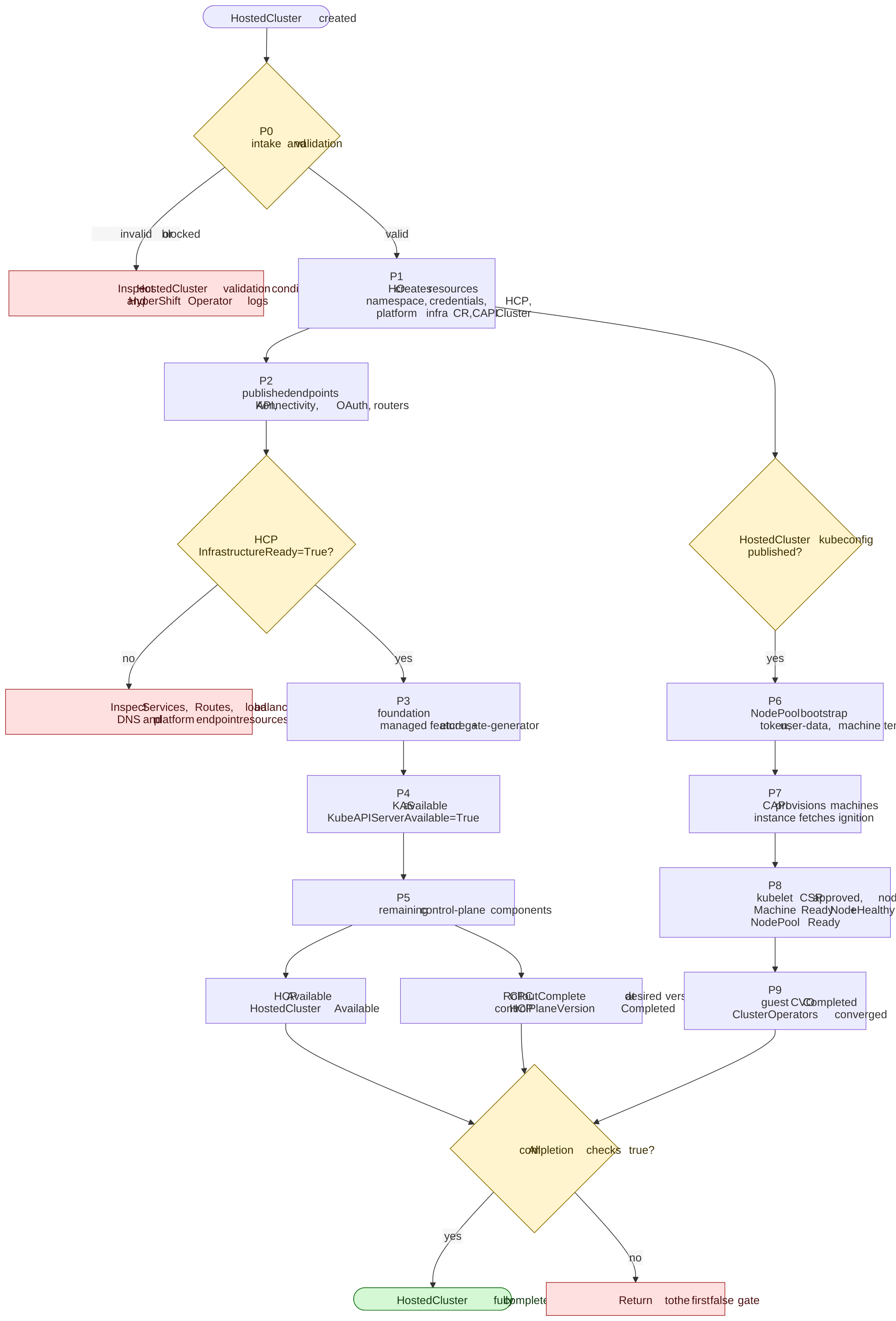
The diagram shows hard gates, not exact execution order. For example, the CPO can publish endpoints while CAPI is still creating cloud infrastructure, and the NodePool controller can build bootstrap resources while OLM or another control-plane component is still becoming available. Kubeconfig publication and KAS Deployment availability are separate observations; the kubeconfig can be published first. HCP availability and control-plane rollout completion are also separate gates, both required by the full completion checklist.
Check control-plane, worker, and guest readiness
Check all three groups of conditions. Control-plane availability alone does not establish worker or guest readiness. The arrows join the required checks; they do not show startup order.
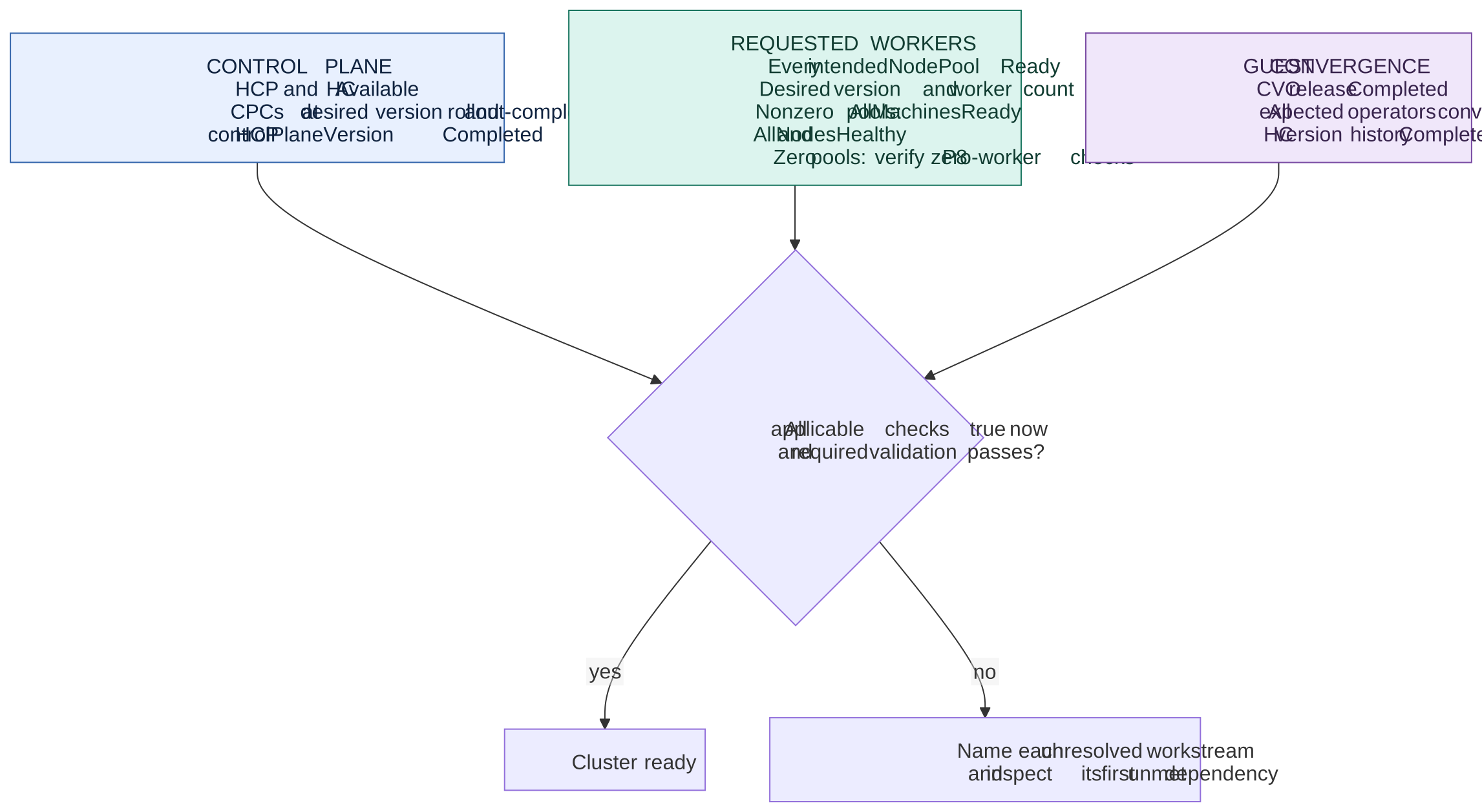
If the user requested only a control plane, report its availability and assess rollout completion separately using P5. Do not create workers when the user intentionally omitted NodePools or set zero replicas. An autoscaling minimum of zero still expresses worker intent; check the pool's current desired size using P8.
Stage map
| Stage | Hard gate to leave the stage | Primary evidence | First place to investigate |
|---|---|---|---|
| P0 Intake | HO accepts the HostedCluster configuration and release image | HostedCluster validation conditions; HCP may not exist yet | HostedCluster conditions and HO logs |
| P1 Management resources | HCP, platform infrastructure CR, and CAPI Cluster exist; management operators are deployed |
HCP and CAPI resources; HO deployments | HO logs, namespace events, credential Secrets |
| P2 Endpoints | HCP InfrastructureReady=True |
HCP condition; Services, Routes, load balancers, DNS | HCP condition reason; endpoint resources; platform DNS/endpoint conditions |
| P3 Foundation | Managed etcd and featuregate-generator are ready | CPC status; etcd StatefulSet; featuregate Job; HCP EtcdAvailable |
etcd pods, PVCs, events, certificates; featuregate Job |
| P4 KAS | KAS workload is available, the hosted kubeconfig is published, and the KAS endpoint selected by CPO passes its health check | HCP KubeAPIServerAvailable; HCP kubeconfig; HostedCluster kubeconfig; endpoint probe result and HCP Available reason |
KAS deployment, pods, Service/LB health, HCP status reason |
| P5 Control-plane convergence | Every CPC is available and rollout-complete at the desired version | CPC conditions; HCP Available and controlPlaneVersion |
CPC dependency messages, deployment status, component operand status |
| P6 NodePool bootstrap | Bootstrap payload, token, machine template, and CAPI workload exist | NodePool conditions and Secrets; MachineDeployment or MachineSet | NodePool conditions, kubeconfig status, user-data/token Secrets, HO logs |
| P7 Machine provisioning | Cloud machine exists and the ignition server records an accepted payload request | CAPI Machine and platform machine; NodePool ReachedIgnitionEndpoint |
CAPI provider logs, machine events, ignition DNS/endpoint, console logs |
| P8 Worker readiness | Requested workers are ready and healthy, or the pool satisfies the zero-worker checks in P8 | NodePool Ready, AllMachinesReady, AllNodesHealthy |
CAPI Machine conditions, guest CSRs, machine-approver logs, guest node and network status |
| P9 Guest convergence | Guest CVO completes and ClusterOperators converge | HostedCluster status.version; guest CVO and ClusterOperators |
Guest CVO, ClusterOperators, HCCO logs, HCP conditions |
Before P0: provisioning inputs
The roadmap clock starts when the HostedCluster API object is created. The
create command can provision infrastructure before that point.
For example, hypershift create cluster aws creates the VPC, subnets, NAT
gateway, DNS zones, OIDC configuration, and IAM roles before submitting the
HostedCluster, unless existing infrastructure and IAM inputs are supplied.
Before the HostedCluster object exists, inspect the create command's logs
for progress and errors. An AWS NAT gateway or IAM provisioning wait at this
point is outside P0; it cannot appear in HostedCluster conditions because the
object does not exist yet. The later AWSCluster resource represents the CAPI
infrastructure object, not the start of this CLI provisioning work.
An AWS NatGatewayLimitExceeded error is another example of a failure before
P0. Check the NAT gateway quota and usage in the selected availability zone,
including gateways being deleted. A failed create can leave a VPC, subnets,
internet gateway, and allocated Elastic IP even though no HostedCluster exists.
Preserve the failed attempt's infrastructure ID and logs, then clean up those
resources before retrying; do not treat "no HostedCluster found" as proof that
the create command allocated nothing.
Record both intervals to include the work before HC creation:
- Command start to HostedCluster creation: infrastructure and identity setup.
- HostedCluster creation to each readiness gate: the P0 through P9 controller timeline.
Record create-command start before running the create script. Use the HostedCluster creation timestamp as t=0 so infrastructure setup before object creation stays separate from P0–P9 controller startup.
Diagnostic setup
Use an authenticated kubeconfig for the management cluster. List its contexts
with oc config get-contexts, then replace the example values below. HC_NAME
and HC_NAMESPACE are the HostedCluster object's name and namespace. The HCP
namespace combines them, replacing dots in the HostedCluster name with dashes.
MANAGEMENT_CONTEXT="my-management-cluster"
HC_NAMESPACE="clusters"
HC_NAME="my-hosted-cluster"
HCP_NAMESPACE="${HC_NAMESPACE}-${HC_NAME//./-}"

oc config use-context "$MANAGEMENT_CONTEXT"
oc config current-context
Verify that context selection succeeded and names the intended management
cluster before running the diagnostics. Commands target that context unless
an explicit guest kubeconfig is supplied. Select NODEPOOL_NAME from the
matching pools in P6; the guest kubeconfig and CSR variables are introduced
where used.
P0: intake and validation
The HO validates the HostedCluster before it can create a usable control plane. The exact validation set depends on platform and capabilities, but common conditions include:
ValidConfigurationSupportedHostedClusterValidReleaseImageValidIDPConfigurationValidProxyConfiguration- AWS:
ValidAWSIdentityProvider,ValidAWSKMSConfig, and related credential and endpoint conditions - Azure:
ValidAzureKMSConfigand workload-identity validation
If a blocking validation condition is false, the HO stops the remaining startup
work for that reconciliation. This appears as a HostedCluster condition or a blocked
Progressing reason, often before an HCP exists.
Validation continues after the HO creates the initial resources. For example,
OIDC document publication can fail after KAS has started. Depending on the
deployed CPO revision, an AWS identity check can remain Unknown while KAS or
its EC2 client is unavailable; inspect the actual condition message. A later
ValidOIDCConfiguration=False can therefore make P0 the first false gate while
P1 through P4 resources already exist. Read the condition message and HO logs
to identify the failure. A failed validation condition does not mean those
resources were removed.
For an AWS OIDC upload failure, distinguish the two credential file formats:
create cluster aws --sts-creds accepts STS JSON, while
install --oidc-storage-provider-s3-credentials supplies a shared AWS INI
profile to the HO SDK. Temporary credentials in that profile need
aws_session_token as well as the access key and secret key. An HO log showing
credential fallback to EC2 IMDS can indicate an unreadable or incorrectly
formatted profile; it does not necessarily mean the STS session expired.
Inspect:
oc get hostedcluster "$HC_NAME" -n "$HC_NAMESPACE" \
  -o json | jq -r '(.status.conditions // [] | if length == 0 then
      [{type: "Conditions", status: "Unknown", reason: "ConditionsMissing",
        message: "No status conditions reported"}]
    else . end)[]
  | [.type, .status, .reason, .message, .lastTransitionTime] | @tsv'

oc logs -n hypershift deployment/operator --tail=200
P1: management-cluster resources
After validation, the HO reconciles these resources:
- Resolve the CPO image and create or update the control-plane namespace. The
namespace name is
<hostedcluster-namespace>-<hostedcluster-name>, with dots in the cluster name replaced by dashes. - Reconcile platform credentials, pull secret, and encryption configuration.
- Reconcile the
HostedControlPlane, then the platform infrastructure CR, then the CAPICluster. - Deploy the CPO, CAPI manager (
cluster-api), CAPI provider (capi-provider), and optionally Karpenter. - Reconcile RBAC and network policies.
HostedCluster namespaces can be shared
Multiple HostedCluster definitions can share the management-cluster
namespace that contains the HostedCluster resources. Each HostedCluster
still gets its own derived HostedControlPlane namespace,
<hostedcluster-namespace>-<hostedcluster-name>. NodePools select their
HostedCluster with spec.clusterName; filter by that field when tracking
worker readiness so unrelated HostedClusters are not mixed together.
For per-cluster disaster recovery, OCPBUGS-61116 reports that restoring a backup which includes a shared HostedCluster namespace can also restore other HostedClusters' resources from that namespace. Use separate HostedCluster namespaces or cluster-specific backup filtering in that case.
The platform infrastructure CR is AWSCluster on AWS and AzureCluster on
self-managed Azure. Azure also creates an AzureClusterIdentity.
This stage is shared by AWS and Azure, but the credential and identity inputs differ:
| Concern | AWS | Self-managed Azure |
|---|---|---|
| Management identity | STS/OIDC federation and IAM roles; CAPA credential Secrets | Workload identities and federated credentials; AzureClusterIdentity |
| CAPI infrastructure | AWSCluster |
AzureCluster plus AzureClusterIdentity |
| CAPI provider | CAPA (capi-provider) |
CAPZ (capi-provider) |
Inspect:
oc get hostedcontrolplane "$HC_NAME" -n "$HCP_NAMESPACE" -o yaml
oc get cluster.cluster.x-k8s.io -n "$HCP_NAMESPACE"
oc get awscluster -n "$HCP_NAMESPACE"                 # AWS
oc get azurecluster,azureclusteridentity -n "$HCP_NAMESPACE"  # Azure
oc get deployment -n "$HCP_NAMESPACE" \
  control-plane-operator cluster-api capi-provider
oc get events -n "$HCP_NAMESPACE" --sort-by=.lastTimestamp
An existing HCP only proves that the API object was created. It does not prove that the CPO is running or that the platform infrastructure is ready.
On AWS, the capi-provider pod can initially wait for the
service-network-admin-kubeconfig Secret. Its init container uses the guest API,
so the pod can remain unready while P2 through P4 proceed. A transient
FailedMount event for that Secret alone does not establish that AWS credentials
are wrong. Check whether KAS is still starting before treating this as a
separate provider failure.
P2: endpoint publication
The CPO first reconciles the infrastructure services used to publish the control plane: API server, Konnectivity, OAuth when enabled, OpenShift API server, OLM package server, and HCP router services. It then reads their status.
InfrastructureReady=True means the required published endpoint addresses are
available. It does not mean the AWSCluster or AzureCluster is ready. Cloud
network creation and CAPI reconciliation can still be in progress.
If the condition is false, read its reason and message first. Common reasons point to:
- A missing or unpopulated load balancer
- A Service or Route that has not received an address
- A DNS hostname that does not resolve
- An API server or Konnectivity service with no published host/port
- A required internal or external router that is not ready
Platform-specific checks:
- AWS: KAS load balancer or Route, HCP router, endpoint services/PrivateLink,
and managed or external DNS. Look for
AWSEndpointServiceAvailable,AWSEndpointAvailable,ExternalDNSReachable, andPublicEndpointExposedconditions where applicable. - Azure: KAS load balancer, DNS, and, for private clusters, the
AzurePrivateLinkServicestatus and private DNS resources. Azure KAS load balancing in the code examined uses service port7443because6443collides with the management cluster's public load-balancer rule.
Inspect:
oc get hostedcontrolplane "$HC_NAME" -n "$HCP_NAMESPACE" \
  -o jsonpath='{range .status.conditions[?(@.type=="InfrastructureReady")]}{.status}{"\t"}{.reason}{"\t"}{.message}{"\n"}{end}'
oc get service,route -n "$HCP_NAMESPACE"
oc get events -n "$HCP_NAMESPACE" --sort-by=.lastTimestamp
oc logs -n "$HCP_NAMESPACE" deployment/control-plane-operator --tail=200
P3: foundation components
The CPO does not reconcile its component set until the published infrastructure is ready. When it starts, the first dependency chain is:
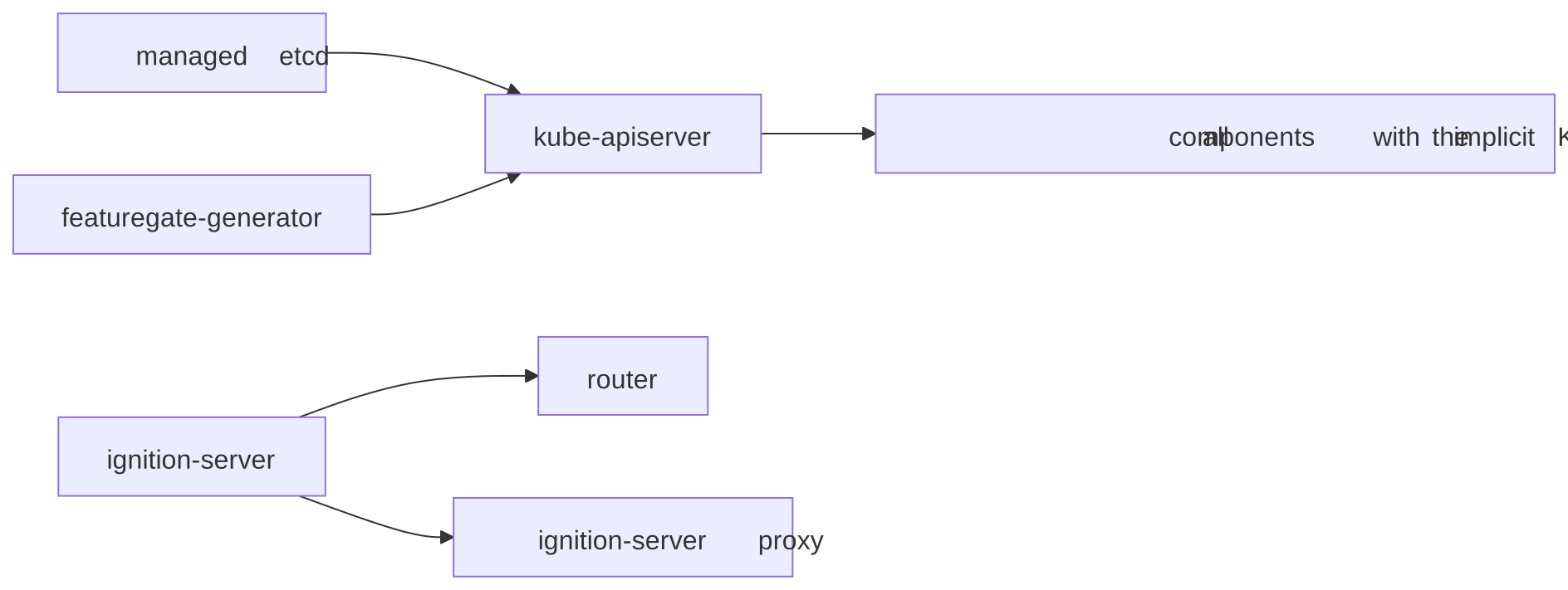
kube-apiserver has explicit dependencies on managed etcd and
featuregate-generator. Most other components wait for KAS to be available and
rollout-complete through an implicit dependency. The exceptions are:
- etcd components, including configured shards such as
etcd-events - featuregate-generator
- control-plane-operator
- cluster-api
- capi-provider
- karpenter and karpenter-operator
- router
- ignition-server
- ignition-server-proxy
Router still depends on ignition-server, and the ignition proxy also depends on ignition-server.
Note
Component registration order is not startup order. For example,
control-plane-pki-operator is registered early but has the implicit KAS
dependency, so it is not the first component to reconcile during initial
startup.
The CPO reports managed etcd status through HCP EtcdAvailable and KAS status
through HCP KubeAPIServerAvailable. It computes both conditions from the
existing StatefulSet and Deployment before reconciling component updates. A
condition can therefore lag the workload by a reconcile cycle.
Inspect:
oc get controlplanecomponent -n "$HCP_NAMESPACE"
oc get controlplanecomponent etcd featuregate-generator kube-apiserver \
  -n "$HCP_NAMESPACE" -o yaml
oc get statefulset etcd -n "$HCP_NAMESPACE"
oc get pods -n "$HCP_NAMESPACE" -l app=etcd
oc get jobs,pods -n "$HCP_NAMESPACE" | grep featuregate
oc get events -n "$HCP_NAMESPACE" --sort-by=.lastTimestamp
For etcd, inspect PVC binding and storage events. For featuregate-generator, inspect the Job and its pod logs.
P4: kube API server and kubeconfig
Several controllers depend on KAS:
- Remaining control-plane components wait for KAS.
- The HO needs an HCP kubeconfig to publish
HostedCluster.status.kubeconfig. - The NodePool controller waits for
HostedCluster.status.kubeconfigbefore it generates node bootstrap data.
KubeAPIServerAvailable=True comes from the KAS Deployment's Available
condition. HCP availability separately runs the KAS endpoint health check.
For public Route or LoadBalancer publishing, CPO probes the corresponding
endpoint. For a private HCP, CPO probes the internal kube-apiserver Service.
A running pod can therefore pass the Deployment check while the selected
endpoint fails its health check.
For a private HCP, a healthy internal Service can leave HCP Available=True
while the published private endpoint is unreachable. Check that endpoint
independently from the intended client network, including its DNS resolution,
load balancer, and network path.
These signals can become true and then false again during initial component
rollouts. Preserve the observations rather than using the latest condition's
lastTransitionTime as the first availability time. Distinguish first
availability from the final rollout and the simultaneous completion checklist.
Once the KAS component creates its kubeconfig Secret, the CPO publishes it in HCP status and the HO copies it to the HostedCluster namespace. NodePool provisioning can start after this copy, even while P5 is still finishing.
Inspect:
oc get deployment kube-apiserver -n "$HCP_NAMESPACE"
oc get pods -n "$HCP_NAMESPACE" -l app=kube-apiserver
oc get hostedcontrolplane "$HC_NAME" -n "$HCP_NAMESPACE" \
  -o jsonpath='{.status.kubeConfig}{"\n"}{.status.controlPlaneEndpoint}{"\n"}'
oc get hostedcluster "$HC_NAME" -n "$HC_NAMESPACE" \
  -o jsonpath='{.status.kubeconfig}{"\n"}'
oc get events -n "$HCP_NAMESPACE" --sort-by=.lastTimestamp
For a failed endpoint health check, inspect the KAS Service, load balancer,
Route, DNS, and network policies. The HCP Available condition reason
KASLoadBalancerNotReachable is specific to this class of failure.
P5: control-plane convergence
After KAS, the remaining components reconcile according to their dependencies. OAuth, CVO, OCM, DNS, ingress, registry, storage, NTO, and OLM also depend on the OpenShift API server. Each dependency must meet all of these conditions:
Available=TrueRolloutComplete=True- Reporting the desired component version
For initial HCP availability, the reconciler checks:
- HCP
InfrastructureReadyis true. - HCP kubeconfig exists.
- Managed etcd is available.
- KAS is available.
- The KAS endpoint selected by CPO passes its health check, as described in P4.
- Every
ControlPlaneComponentin the namespace hasAvailable=True.
The HCP check evaluates those conditions in priority order. Its reason and
message identify the first failed check. When the reason is
ControlPlaneComponentsNotAvailable, the message lists the affected component
names.
Once HCP is already available and the KAS endpoint selected by CPO remains healthy,
the reconciler skips the CPC availability check. A later unavailable CPC does
not necessarily clear HCP Available. Check current CPC availability and
rollout state independently in the full-completion checklist below.
HostedCluster Available is copied from HCP Available, so it has the same
meaning. It is not a worker-readiness check.
For management-side rollout completion, use HCP
status.controlPlaneVersion.history[0]. Completed means every CPC
reported the desired version with RolloutComplete=True. This is stricter than
checking Available alone. In Go, the corresponding OpenShift API constant is
configv1.CompletedUpdate, but its serialized value is Completed.
Inspect:
oc get hostedcontrolplane "$HC_NAME" -n "$HCP_NAMESPACE" \
  -o jsonpath='{range .status.conditions[?(@.type=="Available")]}{.status}{"\t"}{.reason}{"\t"}{.message}{"\n"}{end}'
oc get controlplanecomponent -n "$HCP_NAMESPACE" -o wide
oc get controlplanecomponent -n "$HCP_NAMESPACE" \
  -o json | jq -r '.items[]
  | .metadata.name as $name
  | (.status.conditions // [] | if length == 0 then
      [{type: "Conditions", status: "Unknown", reason: "ConditionsMissing",
        message: "No status conditions reported"}]
    else . end)[]
  | select(.status != "True")
  | [$name, .type, .status, .reason, .message] | @tsv'
oc get deployment -n "$HCP_NAMESPACE"
oc get pods -n "$HCP_NAMESPACE"
The condition summaries emit Unknown with reason ConditionsMissing when a
resource has no conditions yet. Start with the newest false condition or rollout
reason. WaitingForDependencies identifies a dependency chain. WaitingForOperands means the primary workload
is ready but a child deployment is not.
Network startup gates across P5 and P8
A Deployment or Pod can exist before its application starts serving. Network
startup includes several such waits, spanning the management cluster and guest
workers. Controllers retry reconciliation, init containers poll APIs, and
applications wait for files or certificates. A Kubernetes Event can explain a
wait; it is not necessarily the trigger that releases it.
The gates below follow the component sources in the 5.0.0-rc.7 release used
for the AWS observations. They describe code dependencies, not additional
measured timings. Check the deployed release before applying them to another
version. The diagram assumes OVN-Kubernetes, multi-network enabled, and network
node identity enabled. Multi-network can be disabled. Node identity defaults to
enabled; the guest openshift-network-operator/network-node-identity ConfigMap
can override it through data.enabled.
| Workload or resource | Location | Prerequisite and visible wait | First check |
|---|---|---|---|
cluster-network-operator (CNO) |
HCP namespace on management cluster | CPC dependencies include KAS and OpenShift API. The availability-prober init container additionally waits for a successful API probe, discovery of Network, EgressRouter, and OperatorPKI APIs, guest Infrastructure/cluster.status.infrastructureName, and the cluster-network-operator ClusterRoleBinding. |
CPC dependency reason, then availability-prober logs. A Pod in Init has not started the operator application. |
| CNO guest credentials | HCP namespace on management cluster | After the prober, init-client-token-minter must mint a guest service-account token before the main containers start. |
Init-container status and logs; guest API reachability and openshift-network-operator/cluster-network-operator service account. |
| Network operand manifests | Both clusters, reconciled by CNO | Rendering hosted Multus admission resources requires the HCP root-ca ConfigMap with ca.crt. A rendering error can leave operands absent even though CNO is running. |
CNO application logs and the management-side ConfigMap. |
multus-admission-controller and network-node-identity Pods |
HCP namespace on management cluster | Required volumes include serving-certificate Secrets, root-ca, and service-network-admin-kubeconfig. After init, application containers wait for a guest token written by a sidecar. Missing tokens can cause container restarts. |
Pod events for FailedMount; then hosted-cluster-token logs for Multus admission or token-minter logs for node identity. |
network-node-identity.openshift.io ValidatingWebhookConfiguration |
Guest API | CNO defers initial webhook registration until the node-identity Deployment finishes progressing and a usable CA bundle exists. The Deployment itself is rendered before this gate passes. | Management-side Deployment rollout and CA; guest webhook object. Its initial absence can be an intentional wait. |
multus DaemonSet application |
Guest workers, openshift-multus |
For OVN, the daemon waits for /host/run/multus/cni/net.d/10-ovn-kubernetes.conf before launching its listener. Its Pod uses host networking and can start before normal pod networking works. |
kube-multus logs and the same node's ovnkube-node status/logs. The file is /run/multus/cni/net.d/10-ovn-kubernetes.conf on the worker. |
| Multus per-node client certificate | Guest worker and guest API | When node identity is enabled, Multus then waits for its client certificate. Its CSR must be approved and signed; a running Multus container does not prove this has happened. | Multus Waiting for certificate logs, guest CSRs, management-side node-identity approver logs, and signing-controller health. |
CPO reconciles the serving-certificate Secrets
multus-admission-controller-secret and network-node-identity-secret in the
HCP namespace using the HCP root CA. Multus certificate reconciliation applies
when multi-network is enabled.
If the corresponding Service has a
service.alpha.openshift.io/serving-cert-secret-name or
service.beta.openshift.io/serving-cert-secret-name annotation, CPO skips its
root-CA certificate reconciliation for that Service. Check the Service
annotations and Secret ownership to identify the responsible controller. Guest
service-ca readiness is not a universal prerequisite for these hosted Pods.
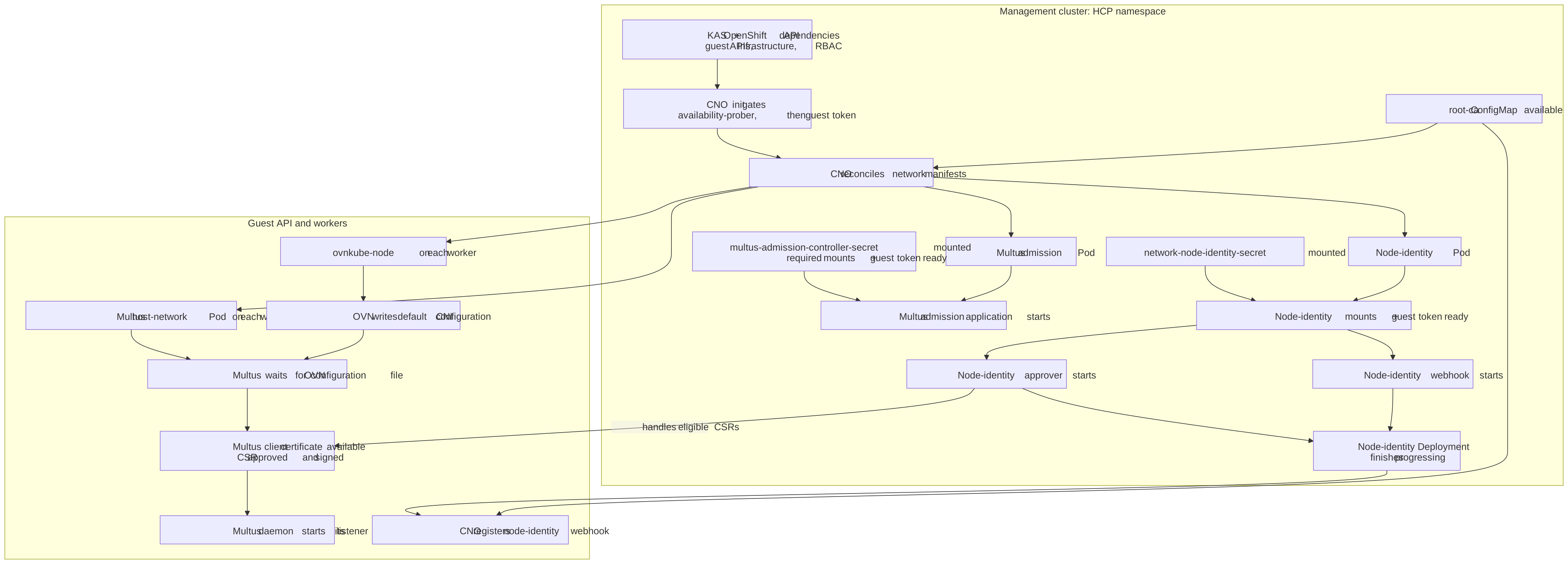
The webhook-registration branch is distinct from the approver branch. Webhook
registration is not a prerequisite for requesting a Multus certificate. The
node-identity approver container handles eligible Multus CSRs, while a signing
controller issues the certificate after approval.
The CNO source also checks kube-system/bootstrap for status: complete in its
non-hosted path. That check gates webhook registration for conventional
OpenShift; the HyperShift branch does not use it. It is not a HostedCluster
milestone to wait for.
For OVN on AWS and Azure, CPO's CNO operand rollout check waits for the
management-side ovnkube-control-plane, network-node-identity, and
cloud-network-config-controller Deployments, plus multus-admission-controller
when multi-network is enabled. This check verifies operand images and Deployment
readiness. Guest DaemonSets, node networking, and ClusterOperator convergence
still need their own checks in P8 and P9.
Inspect the waiting network workload
Use the management-cluster context for the first block. Read init-container and
sidecar logs before treating a restarting application as the source of the
failure. Select the affected Pod for describe; check previous container logs
when it has restarted.
oc get controlplanecomponent cluster-network-operator -n "$HCP_NAMESPACE" -o yaml
oc get deployment,pod -n "$HCP_NAMESPACE"
oc describe pod "$NETWORK_POD" -n "$HCP_NAMESPACE"
oc logs deployment/cluster-network-operator -n "$HCP_NAMESPACE" -c availability-prober
oc logs deployment/cluster-network-operator -n "$HCP_NAMESPACE" -c init-client-token-minter
oc logs deployment/cluster-network-operator -n "$HCP_NAMESPACE" -c cluster-network-operator
oc get configmap root-ca -n "$HCP_NAMESPACE"
oc get secret root-ca service-network-admin-kubeconfig \
  multus-admission-controller-secret network-node-identity-secret -n "$HCP_NAMESPACE"
oc logs deployment/multus-admission-controller -n "$HCP_NAMESPACE" -c hosted-cluster-token
oc logs deployment/network-node-identity -n "$HCP_NAMESPACE" -c token-minter
oc logs deployment/network-node-identity -n "$HCP_NAMESPACE" -c approver
Use an existing guest kubeconfig for the next block. Inspect the Multus Pod and OVN Pod on the affected worker, rather than an arbitrary DaemonSet replica. For pending CSRs, inspect the requester, signer, conditions, and approver logs; an approved CSR with no issued certificate points to signing rather than approval. Diagnose the failed check before considering any approval action.
oc --kubeconfig="$GUEST_KUBECONFIG" get infrastructure cluster \
  -o jsonpath='{.status.infrastructureName}{"\n"}'
oc --kubeconfig="$GUEST_KUBECONFIG" get clusterrolebinding cluster-network-operator
oc --kubeconfig="$GUEST_KUBECONFIG" get validatingwebhookconfiguration network-node-identity.openshift.io
oc --kubeconfig="$GUEST_KUBECONFIG" get daemonset,pod -n openshift-multus -o wide
oc --kubeconfig="$GUEST_KUBECONFIG" logs "$MULTUS_POD" -n openshift-multus -c kube-multus
oc --kubeconfig="$GUEST_KUBECONFIG" get daemonset,pod -n openshift-ovn-kubernetes -o wide
oc --kubeconfig="$GUEST_KUBECONFIG" get csr
oc --kubeconfig="$GUEST_KUBECONFIG" describe csr "$CSR_NAME"
oc --kubeconfig="$GUEST_KUBECONFIG" describe node "$NODE_NAME"
oc --kubeconfig="$GUEST_KUBECONFIG" get clusteroperator network -o yaml
Sources pinned to the release:
| Gate | Implementation |
|---|---|
| CNO startup and operand rollout | Component dependencies and prober configuration; CNO init and token containers |
| Hosted operand rendering, certificates, and tokens | Multus admission renderer; Multus admission manifest; CPO serving certificates |
| Node-identity configuration, webhook, and approver | Enablement; webhook registration; hosted Deployment; Multus CSR acceptance configuration |
| Guest Multus startup | DaemonSet configuration; daemon file wait; per-node certificate wait |
P6: NodePool bootstrap
The NodePool controller evaluates validation and rollout conditions before it creates machine resources. Check these conditions:
ValidReleaseImageValidPlatformImageValidMachineConfigValidPlatformConfigSupportedVersionSkewIgnitionEndpointAvailableUpdatingVersion
The controller normally removes IgnitionEndpointAvailable from NodePool
status when the endpoint is healthy. A False condition indicates a problem.
The controller then waits for HostedCluster.status.kubeconfig. Once present,
it generates the bootstrap configuration and reconciles:
- A token Secret and a user-data Secret, named with the configuration hash
- The platform machine template
- A CAPI
MachineDeploymentforReplaceupgrades (the default) - A CAPI
MachineSetforInPlaceupgrades
On AWS, ValidGeneratedPayload=True can coexist with
AWSSecurityGroupAvailable=False (DefaultSGNotReady) and no Machines. The
NodePool is waiting for the HostedCluster's default worker security group to be
published in status.platform.aws.defaultWorkerSecurityGroupID. Check the
HCP ValidAWSIdentityProvider and AWSDefaultSecurityGroupCreated conditions,
CPO logs, and that HostedCluster status field before investigating ignition
delivery or guest kubelet startup. The CPO waits for identity-provider
validation before creating this security group; a ready AWSCluster alone does
not prove the default worker security group is available.
For the observed 5.0.0-rc.7 CPO revision
b9d6ae1c63453c012e889525eb924b3a07bac26b, the
AWS health check
explicitly checks KAS availability. Both retained traces contain its
KAS-unavailable message with ValidAWSIdentityProvider=Unknown. This branch
returns no error; a successful complete health-check update selects the
five-minute interval. An unavailable EC2 client also produces Unknown without
an error, so verify the deployed revision, condition message, and client and
credential configuration before assigning the cause of a similar wait. See the
AWS startup debugging examples.
The NodePool controller sets status.version after the initial CAPI workload
rollout completes. An empty status.version during initial provisioning is
expected.
Inspect:
oc get nodepool -n "$HC_NAMESPACE" -o json | jq --arg hc "$HC_NAME" \
  '[.items[] | select(.spec.clusterName == $hc)
  | {name: .metadata.name, replicas: .spec.replicas,
     autoScaling: .spec.autoScaling, version: .status.version}]'
oc describe nodepool "$NODEPOOL_NAME" -n "$HC_NAMESPACE"
oc get secret -n "$HCP_NAMESPACE" \
  -o json | jq -r '.items[].metadata.name
  | select(startswith("token-") or startswith("user-data-"))'
oc get machinedeployment,machineset -n "$HCP_NAMESPACE"
oc get machines -n "$HCP_NAMESPACE"
oc get events -n "$HCP_NAMESPACE" --sort-by=.lastTimestamp
Select NODEPOOL_NAME from the matching HostedCluster's pools above before
describing it. HostedCluster namespaces can contain pools for other clusters.
Never print or paste Secret data while debugging. Names, creation timestamps, and annotations are sufficient for this stage.
If no machine workload exists, first confirm that the HostedCluster kubeconfig is populated, then check the NodePool conditions and the HO logs for machine template or bootstrap errors.
P7: cloud machine and ignition
The CAPI manager creates both the Machine and its infrastructure machine
object by cloning the infrastructure template supplied by the NodePool
controller. The platform provider reconciles that infrastructure machine object
to provision the cloud instance:
- AWS: CAPI creates an
AWSMachinefrom theAWSMachineTemplate; CAPA reconciles it to create the EC2 instance. - Self-managed Azure: CAPI creates an
AzureMachinefrom theAzureMachineTemplate; CAPZ reconciles it to create the Azure VM.
The instance boots with the generated user data and fetches its Ignition
payload. NodePool ReachedIgnitionEndpoint=True means the ignition server
accepted an authenticated payload request and attempted to write the response.
It records this server-side observation by annotating the token Secret with
hypershift.openshift.io/ignition-reached. The handler does not check the
response write error before annotating the Secret, so the condition does not
prove that the client received the full payload.
This condition also does not establish that every machine reached ignition, that any node registered, or that kubelet is healthy.
The OS can still be applying its first-boot MachineConfig and rebooting before kubelet starts and requests a certificate. In the AWS observation, console output showed Machine Config Daemon first-boot work after ignition was reached and before any guest CSR or Node existed. If the server recorded a request but no Node exists yet, inspect instance boot progress and client-side ignition logs to distinguish a delivery failure from later first-boot work.
Inspect:
oc get machines -n "$HCP_NAMESPACE" -o wide
oc get awsmachine -n "$HCP_NAMESPACE"      # AWS
oc get azuremachine -n "$HCP_NAMESPACE"    # Azure
oc logs -n "$HCP_NAMESPACE" deployment/capi-provider -c manager --tail=200
oc get nodepool "$NODEPOOL_NAME" -n "$HC_NAMESPACE" \
  -o jsonpath='{range .status.conditions[?(@.type=="ReachedIgnitionEndpoint")]}{.status}{"\t"}{.reason}{"\t"}{.message}{"\n"}{end}'
oc get events -n "$HCP_NAMESPACE" --sort-by=.lastTimestamp
For AWS, inspect instance console output and verify that the instance can reach the ignition endpoint. For Azure, inspect the VM, boot diagnostics, network security group, and DNS path. The provider-specific node debugging guides contain the next steps for console logs, journals, and bastion access.
P8: worker readiness
AllMachinesReady aggregates the CAPI Machine Ready condition.
AllNodesHealthy aggregates the CAPI Machine NodeHealthy condition.
NodePool Ready reports the CAPI MachineDeployment or MachineSet machine
readiness condition (MachinesReady in current CAPI, Ready in older revisions).
For a pool expected to have workers, use these conditions to locate the failure:
AllMachinesReady=False: the cloud machine, bootstrap, or CAPI machine lifecycle is incomplete.AllMachinesReady=TrueandAllNodesHealthy=False: the instance exists but the node has not registered or is unhealthy.- All three true: the requested workers are usable.
Inspect:
oc get nodepool "$NODEPOOL_NAME" -n "$HC_NAMESPACE" -o yaml
oc get machinedeployment,machineset,machine -n "$HCP_NAMESPACE" -o wide
oc get machine -n "$HCP_NAMESPACE" -o json | jq -r '.items[]
  | .metadata.name as $name
  | (.status.conditions // [] | if length == 0 then
      [{type: "Conditions", status: "Unknown", reason: "ConditionsMissing",
        message: "No status conditions reported"}]
    else . end)[]
  | [$name, .type, .status, .reason, .message] | @tsv'
The aggregate NodePool messages usually identify the first failing machine and
reason. Once a node has registered, use the guest kubeconfig to inspect
oc get nodes and node conditions. Registration does not prove the worker's CNI
is usable. If node conditions or pod events report a networking failure, follow
the network startup gates through the
affected worker's OVN configuration, Multus process, and client certificate.
Pools with zero current workers
AWS and Azure support NodePool autoscaling with spec.autoScaling.min: 0.
That minimum permits zero workers; it does not establish the current desired
size. Inspect the pool's CAPI MachineDeployment or MachineSet with -o yaml.
Before treating an empty pool as expected, verify that its current
spec.replicas is zero, its observed generation and replica counts reflect
that request, and no Machines remain. Check the workload's autoscaler minimum
annotation too: the controller can enforce an effective minimum of one when
scale-from-zero support is unavailable. An absent workload, a positive desired
count, or an unfinished scale-down is not a settled zero-worker pool.
With no Machines, both AllMachinesReady and AllNodesHealthy are False.
For an autoscaled pool, the reason is NotFound with the message
No Machines are created. With explicit spec.replicas: 0, the reason is
AsExpected and the message is NodePool set to no replicas. These aggregate
conditions describe an empty pool; after verifying the zero-worker state above,
they do not by themselves indicate failed provisioning.
Keep the other pool checks: fresh Ready=True, successful validation,
status.version matching the requested release, and no active version or
configuration update. Do not require ignition requests, kubelet CSRs, or node
health from nonexistent workers. This exception does not waive the independent
control-plane or guest-convergence checks in P9. A guest operator waiting for
worker capacity is still an unmet guest gate.
Kubelet CSR approval
After first-boot configuration, kubelet submits a certificate signing request
(CSR) to the guest API. The machine-approver deployment in the HCP namespace
normally approves the kubelet bootstrap CSR after checking the requesting
node's identity against its CAPI Machine. Kubelet needs the issued client
certificate to register the node.
If ignition completed but the node has not registered, check guest CSRs before assuming the cloud instance failed. A pending CSR can mean the approver is not running or the request does not match the expected Machine identity. A guest CSR from Multus or another component is a separate request; inspect its signer, requester, and subject to identify the kubelet request.
Use an existing guest kubeconfig for GUEST_KUBECONFIG. If using the temporary
kubeconfig example in guest convergence,
run these CSR queries inside its subshell before it exits and removes the file.
The CSR queries target the guest cluster; the deployment and Machine queries
target the management cluster:
oc --kubeconfig="$GUEST_KUBECONFIG" get csr
# Select a pending kubelet request from the list above.
oc --kubeconfig="$GUEST_KUBECONFIG" describe csr "$CSR_NAME"
oc get deployment,pods -n "$HCP_NAMESPACE" -l app=machine-approver
oc logs -n "$HCP_NAMESPACE" deployment/machine-approver --tail=200
oc get machines -n "$HCP_NAMESPACE" -o wide
Compare the approver's validation errors with the Machine identity and the node's boot logs. Correct the mismatch or restore the approver rather than approving an unidentified request. If no kubelet CSR exists, return to instance boot and kubelet logs. If the CSR is approved and a certificate issued, continue with kubelet connectivity, node conditions, and network startup checks.
P9: guest convergence and full completion
The Hosted Cluster Config Operator (HCCO) copies version status and CVO
conditions from the guest ClusterVersion into HCP status. The HO then copies
that version status and those conditions into HostedCluster status. At least
one reconciliation separates guest CVO completion from the corresponding
HostedCluster status update. Inspect guest ClusterOperator resources for
individual operator health.
This checklist defines "fully complete" as completion of the requested release
and configuration rollout, together with current health. Deferred
management-side payload drift is outside that definition. On operator revisions
that report ConfigUpdatePending, report True separately: nodes retain the
previous management-side content until the next spec-driven rollout, even if
the checks below pass. The
NodePool rollout state machine
explains how this differs from an active UpdatingConfig rollout.
Use this checklist for "fully complete":
- Required HostedCluster validation conditions pass, with no blocking validation condition false
- HostedCluster and HCP
Available=True, with each condition'sobservedGenerationmatching that object'smetadata.generation - Every
ControlPlaneComponenthasAvailable=TrueandRolloutComplete=Trueat the desired version - HCP
status.controlPlaneVersionobserves the current HCP generation, and its latest history entry isCompletedfor the desired image and semantic version. Resolve the target from HCspec.controlPlaneRelease.image, falling back tospec.release.image, and verify it matches HCP spec and status. Resolve tag/digest equivalence through release metadata. - Every requested NodePool has fresh
Ready=True, and all applicable validation conditions, includingSupportedVersionSkew, areTruewithobservedGenerationmatching the NodePool'smetadata.generation. Itsstatus.versionmatches the semantic version resolved from its requested release, with no activeUpdatingVersionorUpdatingConfigcondition. Pools with a positive desired worker count also have freshAllMachinesReady=TrueandAllNodesHealthy=True. For a verified zero-worker pool, accept only the fresh, expected empty-pool aggregate conditions described in P8; all other pool checks still apply. - HostedCluster's latest version history entry is
Completed, with image and semantic version matching bothstatus.version.desiredand the data-plane target resolved from HCspec.release.image. Resolve tag/digest equivalence through release metadata; stale status cannot prove completion of the current request. - Guest
ClusterVersion.status.observedGenerationmatches the guestClusterVersion.metadata.generation, and its conditions areAvailable=True,Progressing=False, andFailing=False - Every guest ClusterOperator has
Available=True,Progressing=False, andDegraded=False
If monitoring is the remaining operator, inspect its Prometheus custom resource and CMO reconciliation tasks as well as its pods. Healthy existing pods do not prove every operand was created. A bootstrap dependency error can be followed by several minutes of availability validation before a retry creates the missing resource, as seen in the AWS startup debugging examples.
Inspect:
oc get hostedcluster "$HC_NAME" -n "$HC_NAMESPACE" \
  -o jsonpath='{.status.version.history[0].state}{"\t"}{.status.version.history[0].image}{"\n"}'

(
  set -e
  set -o pipefail
  umask 077
  GUEST_KUBECONFIG="$(mktemp)"
  trap 'rm -f "$GUEST_KUBECONFIG"' EXIT
  trap 'exit 130' INT
  trap 'exit 143' TERM
  oc get secret "$HC_NAME-admin-kubeconfig" -n "$HC_NAMESPACE" \
    -o jsonpath='{.data.kubeconfig}' | base64 --decode > "$GUEST_KUBECONFIG"

  KUBECONFIG="$GUEST_KUBECONFIG" oc get clusterversion version -o yaml
  KUBECONFIG="$GUEST_KUBECONFIG" oc get clusteroperators
)
The subshell removes its temporary kubeconfig on completion, command failure,
interrupt, or termination. Its traps and umask stay local to the subshell.
Run any additional guest queries before the closing ). Never commit the
extracted kubeconfig or include it in a support bundle.
Where am I?
Start at the first false gate in the decision tree. Its stage contains the specific objects and logs to inspect. Click the chart to open the full-screen viewer, then zoom and pan to follow its branches.
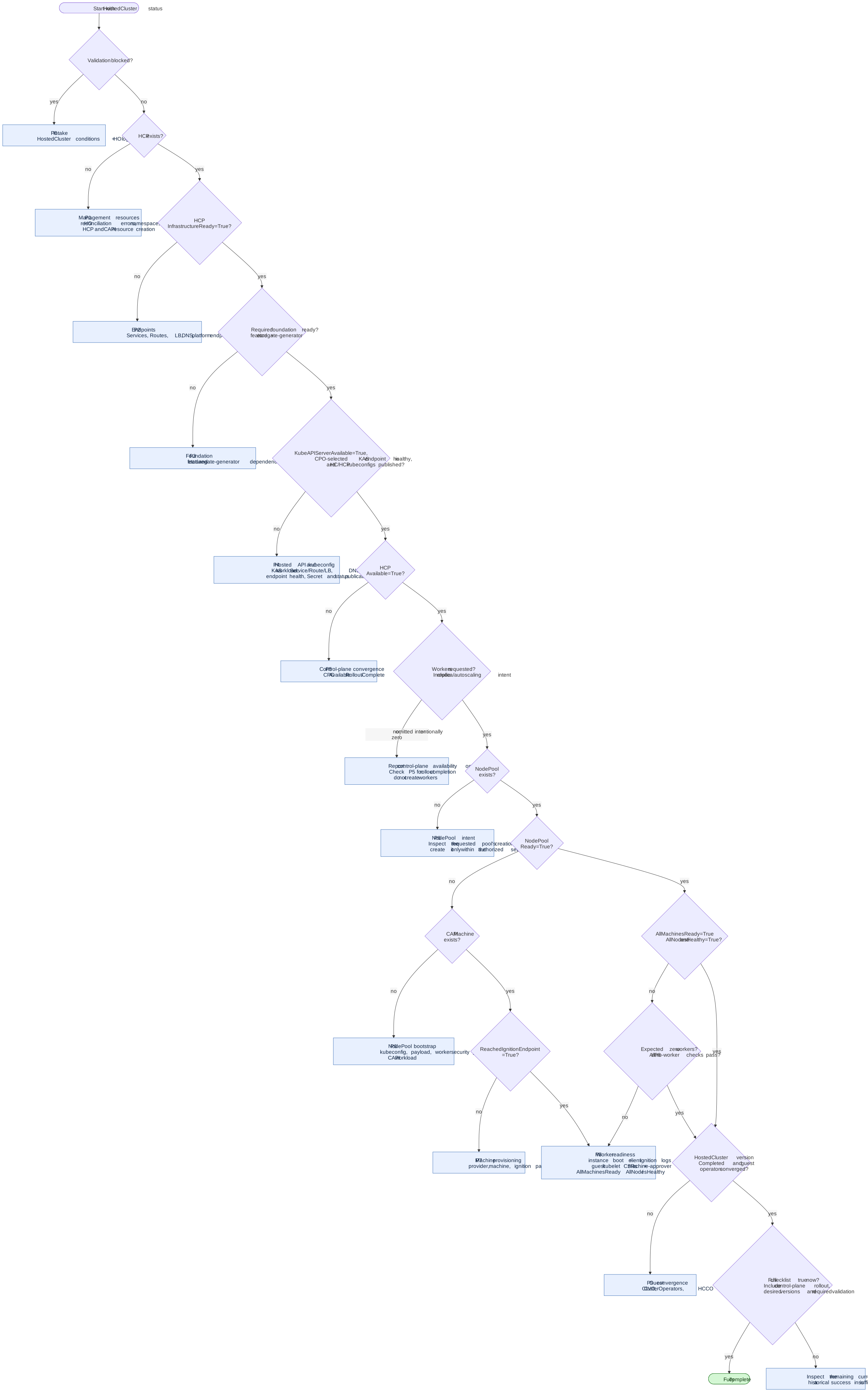
Useful summaries for all stages:
oc get hostedcluster "$HC_NAME" -n "$HC_NAMESPACE" \
  -o json | jq -r '(.status.conditions // [] | if length == 0 then
      [{type: "Conditions", status: "Unknown", reason: "ConditionsMissing",
        message: "No status conditions reported"}]
    else . end)[]
  | [.type, .status, .reason, .message] | @tsv'

oc get hostedcontrolplane "$HC_NAME" -n "$HCP_NAMESPACE" \
  -o json | jq -r '(.status.conditions // [] | if length == 0 then
      [{type: "Conditions", status: "Unknown", reason: "ConditionsMissing",
        message: "No status conditions reported"}]
    else . end)[]
  | [.type, .status, .reason, .message] | @tsv'

oc get nodepool -n "$HC_NAMESPACE" -o json | jq -r --arg hc "$HC_NAME" '.items[]
  | select(.spec.clusterName == $hc)
  | .metadata.name as $name
  | (.status.conditions // [] | if length == 0 then
      [{type: "Conditions", status: "Unknown", reason: "ConditionsMissing",
        message: "No status conditions reported"}]
    else . end)[]
  | [$name, .type, .status, .reason, .message] | @tsv'

oc get events -n "$HC_NAMESPACE" --sort-by=.lastTimestamp
oc get events -n "$HCP_NAMESPACE" --sort-by=.lastTimestamp
Measuring startup
For each run, record the create-command start and the HostedCluster creation
timestamp separately; use the latter as t=0. Capture the status of the
HostedCluster, HostedControlPlane, ControlPlaneComponents, NodePools,
deployments, CAPI and platform machines, and optionally guest CVO,
ClusterOperators, and Nodes. The oc commands above show the core conditions;
use explicit management-cluster and guest-cluster contexts.
Record the HostedCluster namespace, name, and UID with each run. Start a new timeline when the UID changes, even if the namespace and name are reused; do not combine first-seen milestones from different cluster instances.
Use resource creation timestamps and condition lastTransitionTime where
available. For gates without an API timestamp, poll at a known interval and
record the first observation and query duration. The transition can happen
between polls, so report that time as an observation rather than an exact event.
Keep each observation tied to its provider, region, release, HostedCluster and NodePool sizes, endpoint access, management-cluster load, HO image/source, and release CPO image/source. Avoid recording Secret data, kubeconfigs, or tokens.
Timing caveats:
- Controllers write
lastTransitionTimeduring reconciliation. It can lag behind the moment a process became usable. - The CPO writes status before it reconciles every component update, so HCP conditions can lag by a cycle.
InfrastructureReadymeasures published endpoints, not the full cloud infrastructure or worker network.- A single run is an observation, not a baseline. Compare repeated runs only when their cloud, topology, version, and management-cluster load are known.
- The HO can run newer code than the release's CPO; an observed difference from the code map may reflect that version difference.
Code map
| Behavior | Source |
|---|---|
| HO validation, HCP and CAPI resource creation, operator deployments | hypershift-operator/controllers/hostedcluster/hostedcluster_controller.go |
| HCP availability priority and component aggregation | reconcileAvailabilityStatus and controlPlaneComponentsAvailable in control-plane-operator/controllers/hostedcontrolplane/hostedcontrolplane_controller.go |
| CPO infrastructure-first startup and component loop | HostedControlPlaneReconciler.update and registerComponents |
| CPC dependency and rollout gates | support/controlplane-component/status.go |
| HCP infrastructure readiness semantics | control-plane-operator/controllers/hostedcontrolplane/infra/infra.go |
| NodePool condition order and bootstrap gate | hypershift-operator/controllers/nodepool/nodepool_controller.go |
| NodePool machine and node aggregation | hypershift-operator/controllers/nodepool/conditions.go |
| Kubelet CSR approver deployment and guest kubeconfig | control-plane-operator/controllers/hostedcontrolplane/v2/machine_approver/ |
| Ignition-reached annotation | ignition-server/cmd/start.go |
| Guest CVO version and condition propagation | control-plane-operator/hostedclusterconfigoperator/controllers/hcpstatus/hcpstatus.go |
| E2E completion predicates | test/e2e/util/util.go |
See also: